Subscription & Billing
1. How It Works
Biblion offers flexible plans for individual researchers and academic laboratories:
- Free Tier: Core writing tools are permanently free and require no account — PubMed / MEDLINE search, personal library storage, Live References cursor tracking, and unlimited in-Word citation insertion with automatic bibliography updates.
- Pro Tier (Individual & Lab Group): Advanced AI and cloud features — Smart Library AI paragraph recommendations, Auto-Pilot AI manuscript drafting (BYOK), cross-device cloud synchronization, and automatic backup — require a recurring subscription:
- Monthly Plan: $15/month based on 30 active days (flexible month-to-month access, pause or cancel anytime without losing unused days).
- Annual Plan: $150/year ($12.50/month equivalent — Save $30/yr).
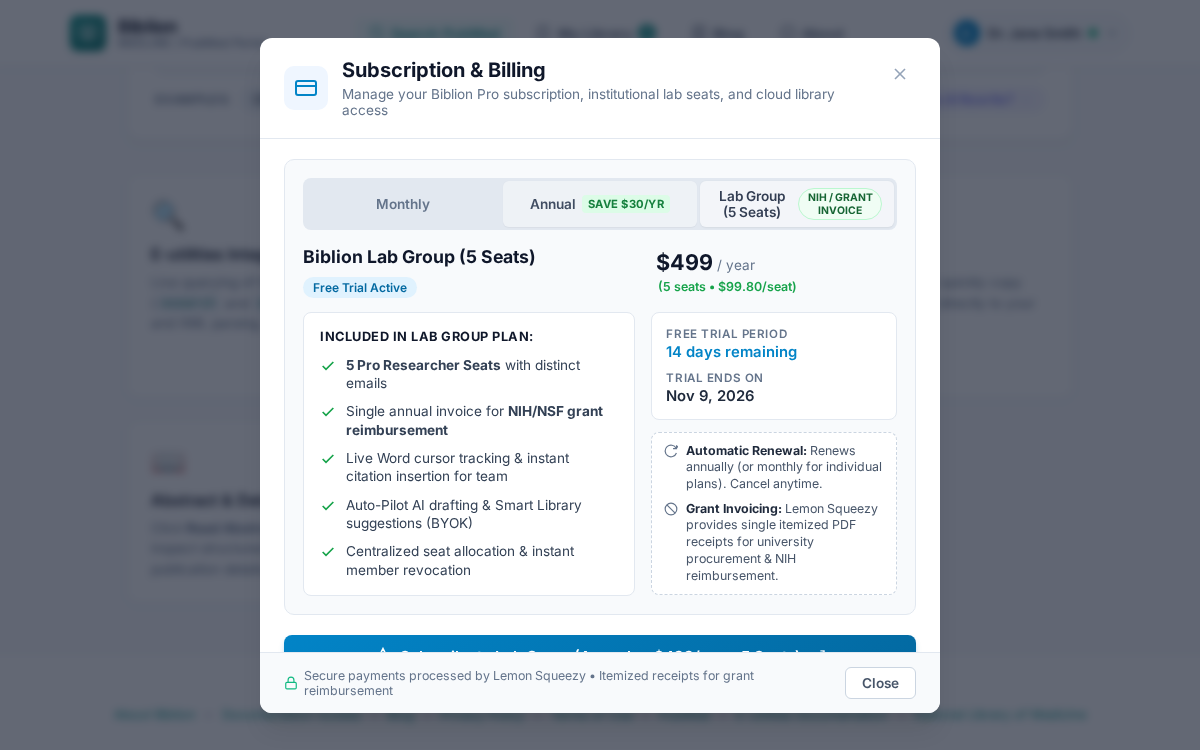
- Lab Group (5 Seats): $499 one-time (1-year license) ($99.80/seat equivalent — covers up to 5 researchers with distinct emails on a single itemized invoice for NIH/NSF or university grant reimbursement, with no automatic renewal).
The 30-Active-Day Advantage (Monthly Plan)
Unlike traditional calendar subscriptions that bill every month regardless of whether you are actively writing, Biblion's monthly Pro plan is measured in 30 active days:
- While your subscription is active, each 24 hours of access decrements your active day balance.
- When you finish drafting a manuscript, submit a paper, or take a sabbatical, you can pause your subscription immediately.
- Pausing halts automatic payment collection and freezes your active-time balance. When you resume months later, you do not pay at the moment of resumption; your remaining prepaid days resume counting down, and the next $15 renewal charge occurs only after your full 30 active days are completed.
When you sign up (create an account), you are automatically granted a 15-day free trial of Pro without needing a credit card upfront. Payments are handled securely by Stripe. Biblion never sees or stores your payment card details.
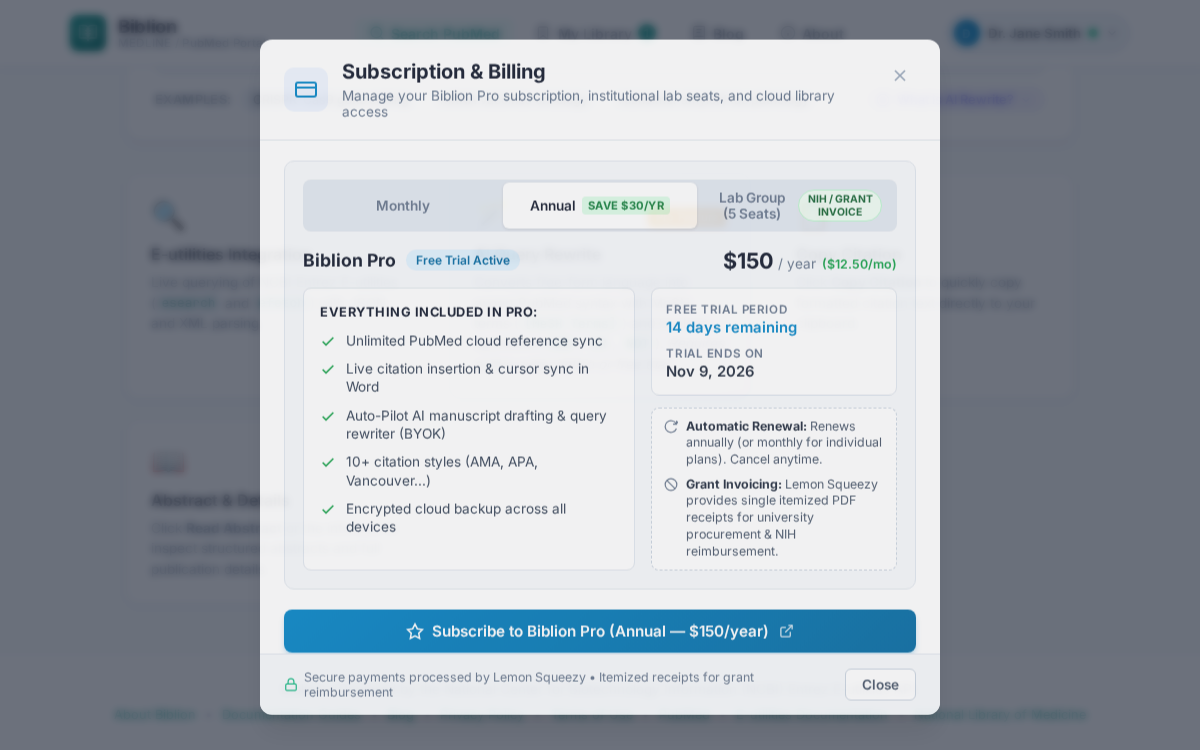
Your subscription status
Your status is shown in the account menu (click your name) and in the Subscription & Billing window:
| Status | What it means |
|---|---|
| Free Trial Active | Full access to Pro features; displays the days remaining (15 days total). |
| Active | Paid Pro subscription ($15/month, $150/year, or $499 one-time 1-year Lab Group); displays card brand, last four digits, and next renewal date (or license expiration date for Lab Group). For monthly Pro plans, displays your exact remaining active days (30 active days per cycle). |
| Paused | Monthly Pro subscription is paused. Automatic payment collection stops, active days are frozen, and account data is safely retained without charges. Resuming is free and restores Pro features immediately. |
| Lab Member Active | Full Pro access funded by your Principal Investigator or laboratory's Biblion Lab Group (5 Seats) subscription. |
| Cancelled (Active until period end) | If cancelled during trial, trial access ends immediately. If cancelled on a paid plan, access remains active until the end of your prepaid active days. |
| Expired - Grace Period | Pro cloud sync is paused, but cloud data is safely preserved for a 30-day countdown before data erasure. |
| Data Erased | The 30-day grace period elapsed without renewal; all cloud data has been permanently purged. |
2. Upgrade to Pro or Lab Group (5 Seats)
- Click your name → Subscription & Billing.
- Select your preferred billing interval tab at the top of the plan card:
- Monthly ($15/month)
- Annual ($150/year —
Save $30/yr) - Lab Group (5 Seats) ($499 one-time, 1 year —
NIH / Grant Invoice)
- Click Subscribe to Biblion Pro (or Subscribe to Lab Group ($499 one-time — 1 Year, 5 Seats)).
- Stripe's secure checkout opens in a new browser tab. Your email is pre-filled and the purchase is linked to your Biblion account automatically.
- Complete payment. Return to Biblion; your status updates to Active immediately.
3. Institutional & Lab Group Seat Management (5 Seats)
When a Principal Investigator (PI), lab manager, or department administrator purchases the Biblion Lab Group (5 Seats) 1-year license ($499 one-time), Biblion automatically creates your laboratory group, assigns Seat 1 to the purchasing account as PI / Owner, and unlocks the Lab Seat Management panel inside Subscription & Billing.
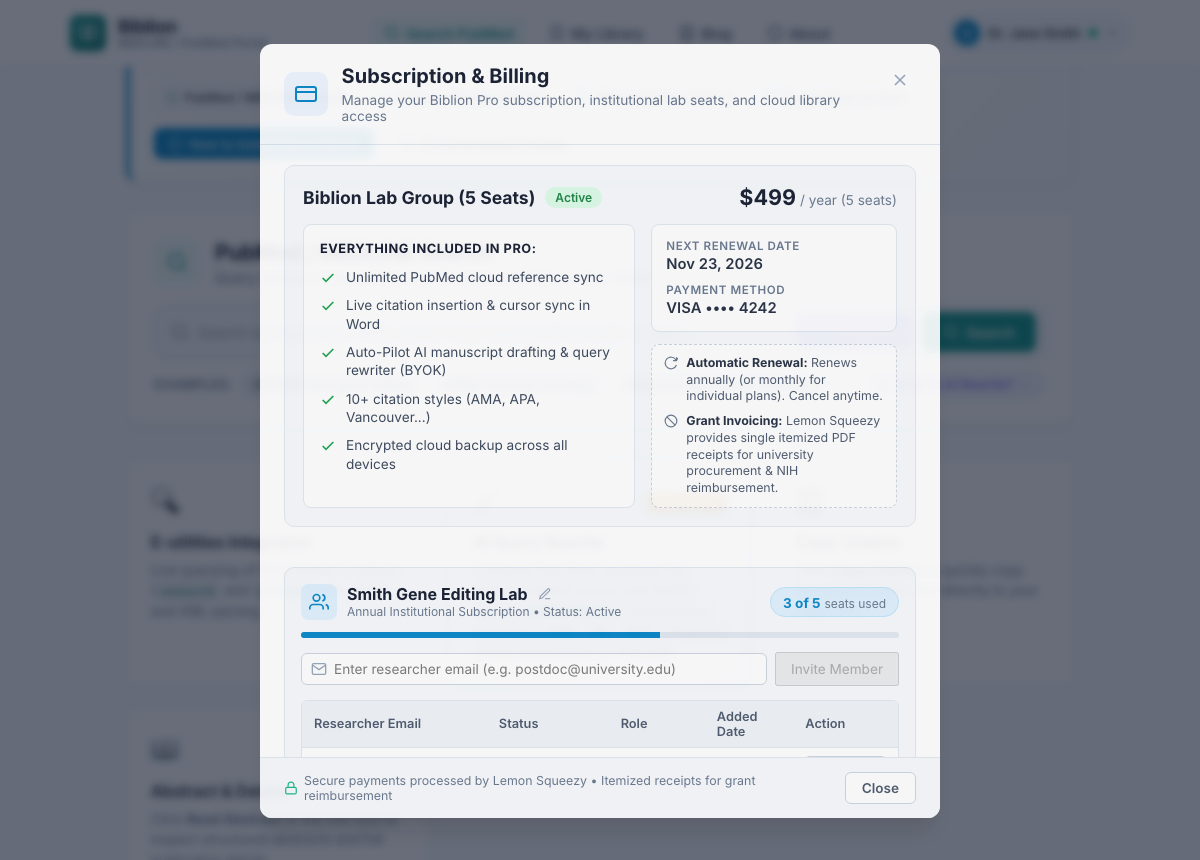
How to Manage Lab Seats (PI / Owner)
- Rename your laboratory: Click the edit icon next to your laboratory heading, type your lab's name (for example,
Smith Gene Editing Lab), and click Save. - Monitor seat capacity: The top-right badge and progress bar show your live seat allocation (
3 of 5 seats used). - Invite lab researchers: Enter a colleague's distinct email address in the
Enter researcher email (e.g. postdoc@university.edu)field and click Invite Member. Biblion sends them an invitation email automatically. - Track member status: The member table lists each researcher's email, Status (
Activeonce linked, orPending Sign-upwhile awaiting registration), Role (PI / OwnerorResearcher), and Added Date. - Revoke or reassign seats:
- Click Remove next to any researcher to revoke their lab seat immediately and return the slot to your available pool.
- Purchasing on behalf of 5 researchers? If you are a department administrator or non-writing lab manager purchasing for 5 other team members, click Release Seat on your own
PI / Ownerrow. Your administrative ownership remains intact while all 5 Pro seats become available for external researchers.
How Invited Researchers Activate Their Lab Seat
- Invited lab members simply sign in or create a free Biblion account using the exact email address invited by the PI.
- Upon sign-in or email verification, their account binds to the lab group automatically (
Lab Member Active) and unlocks full Biblion Pro access across both the web app and the Microsoft Word taskpane. - Duplicate Billing Protection: If a researcher who joins a Lab Group already holds an individual paid subscription, Subscription & Billing displays a Pro Access Covered by [Lab Name] banner with a direct Manage Personal Subscription button so they can pause or cancel their individual billing.
4. Pause, Resume, or Cancel
Biblion provides complete flexibility over your subscription lifecycle, whether you need a brief pause between manuscripts or wish to terminate future renewals:
Pausing Your Subscription (Monthly Pro)
When you finish a manuscript drafting phase or step away from active research, you don't need to cancel or pay for idle days:
- Open Subscription & Billing from your account menu.
- Click Pause Subscription and confirm.
- What happens immediately:
- Payment collection stops: Stripe suspends upcoming renewal charges.
- Active-time countdown halts: Your remaining active days are frozen on your account.
- Data remains safe indefinitely: Your personal library, collections, citations, and annotations are fully protected. Paused accounts are never erased.
- Core tools remain available: PubMed search, personal library browsing, offline notes, and inserting citations into Microsoft Word remain accessible. Cloud synchronization and Pro AI drafting features pause until you resume.
Resuming a Paused Subscription
Whenever you are ready to write again:
- Open Subscription & Billing.
- Click Resume Subscription.
- No immediate charge: Resuming is completely free at the moment of reactivation.
- Your remaining active days resume counting down, and Stripe is automatically scheduled to bill for your next 30-active-day cycle only when your prepaid balance is fully utilized.
72-Hour Advance Renewal Reminders
To keep billing completely transparent, Biblion sends an automated email notification 72 hours before your 30 active days conclude:
- The email clearly specifies your upcoming renewal date, the subscription amount ($15/month), and your active plan details.
- It includes direct instructions on how to pause or cancel if you are not currently drafting, preventing accidental charges.
- If you pause after receiving a reminder, upcoming billing is voided. When you later resume, a fresh reminder is automatically scheduled for your new projected renewal boundary.
Cancelling a Subscription
- Cancelling a Free Trial: If you cancel your free trial, trial access ends immediately, and your account enters the 30-day recovery grace period.
- Cancelling a Paid Subscription: Open Subscription & Billing, click Cancel Subscription, and confirm. Automatic renewal is permanently stopped.
- On monthly Pro plans, if you cancel while active, you retain full access for all remaining prepaid active days.
- If you cancel while paused, future billing is permanently cancelled and you keep every active day you already paid for — Pro access continues for your remaining active days, and only then does your account enter the 30-day recovery grace period.
- Once prepaid active days expire, your account enters the 30-day recovery grace period before cloud data purge.
- Payments are strictly non-refundable.
- Resuming or Renewing a Cancelled Plan:
- During your prepaid access window (before your current access end date): Click Resume Subscription in Subscription & Billing to restore automatic renewal with no new upfront charge.
- During the 30-day recovery grace period (after your paid access period has ended): Click Subscribe to Biblion Pro to start a new billing cycle and immediately restore full Pro access along with your retained cloud library and collections.
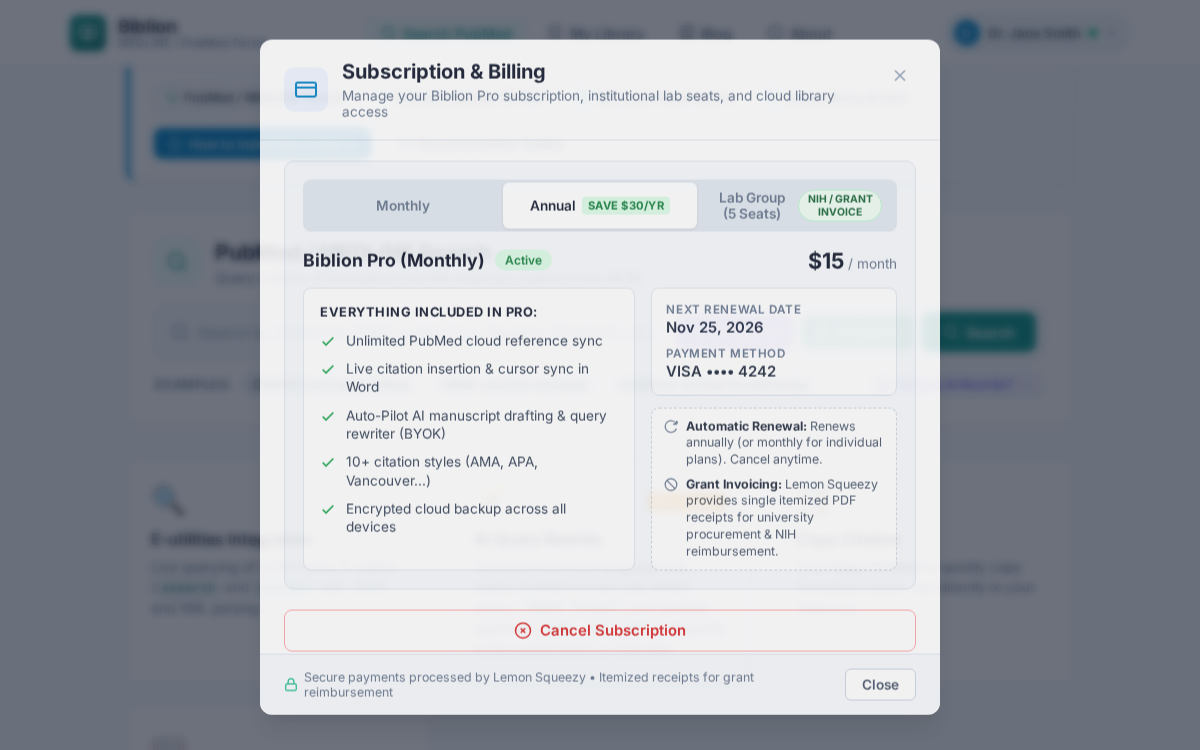
5. Update Payment Details or Get Grant Invoices
Click Manage Billing in Stripe (or Update Payment Method) in the Subscription & Billing window. It opens Stripe's secure customer billing portal in a new tab, where you can update your payment card and download itemized PDF invoices/receipts for university procurement or NIH/NSF grant reimbursement.
6. If Your Subscription Lapses & Data Retention
- 30-Day Recovery Grace Period: If your paid access ends following cancellation, your account enters a 30-day recovery grace period. Cloud sync is temporarily paused, but your existing cloud articles and collections are safely held. A warning banner at the top of Biblion alerts you to the exact days remaining to reactivate.
- Automated Cloud Data Erasure: If you do not reactivate or renew your subscription before the 30-day recovery window closes, all cloud articles, collections, and library data are permanently purged by the automated system. Your account record itself is preserved, allowing you to return and start fresh at any time.
Important: Automated cloud data erasure applies only to cancelled or expired accounts whose paid time has completely elapsed. Paused subscriptions are never erased. Pausing allows you to retain your personal library, annotations, and collections indefinitely without recurring fees.
Tip: Export a local backup from My Library (Export → JSON) at any time to preserve an offline copy of your references and collections.
7. Privacy & Security
- Card details are entered only on Stripe's checkout and billing portal.
- Signing out clears your session and local library from the device; see Account & Sign-In.
For plan or billing questions, see the contact details on the About page or contact support directly at support@biosystechnologies.com.